Private Temporary Tables in the Oracle Database
This blog is part of the overall "10 Oracle Database Features That Fly Under the Radar" and explains what Private Temporary Tables are and gives some practical examples.
What are Private Temporary Tables?
Private Temporary Tables (PTTs) are session-specific tables that automatically clean themselves up when you're done with them. Like a private notepad - they're only visible to your session, and they disappear when your session ends. Introduced in Oracle 18c, they are a cleaner and more secure alternative to Global Temporary Tables.
Why Use Private Temporary Tables?
There are several compelling reasons to use PTTs in your Oracle development:
-
Session Isolation
Unlike regular temporary tables that are visible to all sessions, PTTs are truly private. Only the session that creates them can see or use them. This makes them perfect for sensitive calculations or intermediate results you don't want other sessions to access.
-
Automatic Cleanup
No need to worry about cleanup - when your session ends, the table automatically goes away. This prevents cluttering your database with forgotten temporary objects.
-
No Dictionary Updates
PTTs don't create entries in the data dictionary. This means faster creation and deletion, plus no impact on your database's metadata.
-
Resource Efficiency
Since they're private and temporary, PTTs use minimal undo space and generate minimal redo, making them very efficient for processing intermediate results.
Using Private Temporary Tables
Let's walk through some practical examples of using PTTs.
Connect to your Oracle database using you tool of choice. I'm using SQL*Plus and an on-premises install of Oracle Database 19c in this demo.
You can also checkout Oracle LiveSQL for a fully functioning SQL prompt (you can learn more about it from Jeff Smith, an Oracle product managers blog).
Scenario 1: Understanding PTT Naming Convention
First, let's look at the naming rules for PTTs. They're important:
 -- This will fail - incorrect naming

CREATE PRIVATE TEMPORARY TABLE MY_TEMP_TABLE (id NUMBER, name VARCHAR2(100));
-- This works - proper ORA$PTT_ prefix
CREATE PRIVATE TEMPORARY TABLE ORA$PTT_MY_TEMP (id NUMBER, name VARCHAR2(100)) ON COMMIT PRESERVE DEFINITION; Scenario 2: Understanding Duration Types
PTTs come in two flavors - transaction-duration and session-duration:
-- Transaction-duration PTT (this disappears on commit)

CREATE PRIVATE TEMPORARY TABLE ORA$PTT_TRANS_TEMP (id NUMBER, notes VARCHAR2(100) );
-- Session-duration PTT (survives commit)
CREATE PRIVATE TEMPORARY TABLE ORA$PTT_SESSION_TEMP (id NUMBER, notes VARCHAR2(100)) ON COMMIT PRESERVE DEFINITION; -- Let's add some test data
INSERT INTO ORA$PTT_TRANS_TEMP VALUES (1, 'Will disappear on commit');
INSERT INTO ORA$PTT_SESSION_TEMP VALUES (1, 'Will survive commit');
COMMIT; -- Now ORA$PTT_TRANS_TEMP is gone, but ORA$PTT_SESSION_TEMP remains
select * from ORA$PTT_TRANS_TEMP;
select * from ORA$PTT_SESSION_TEMP;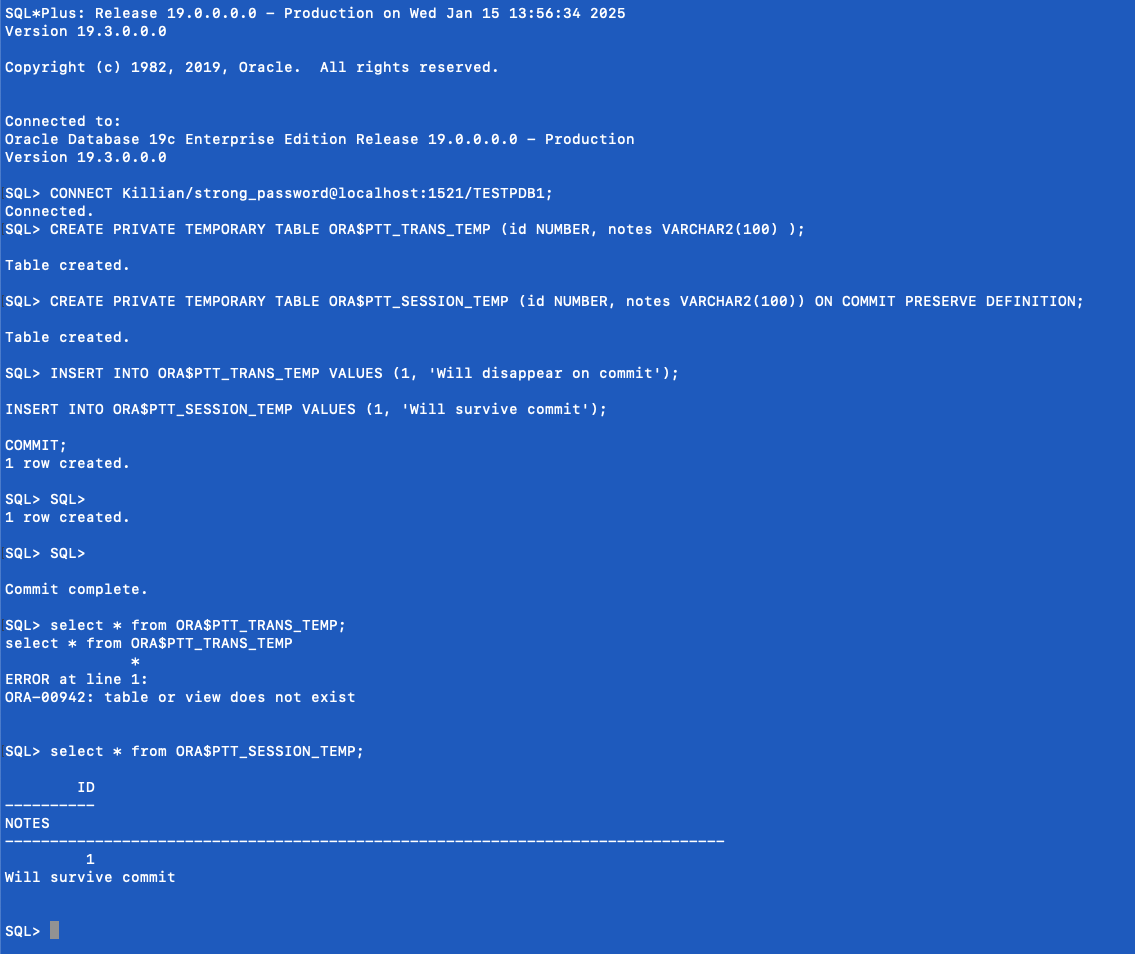
Scenario 3: Session Isolation in Action
Let's see how two different sessions handle the same table name:
Session 1:
CREATE PRIVATE TEMPORARY TABLE ORA$PTT_SHARED (id NUMBER, data VARCHAR2(100)) ON COMMIT PRESERVE DEFINITION;

INSERT INTO ORA$PTT_SHARED VALUES (1, 'Session 1 data');

COMMIT;
Session 2:
-- This fails - the table doesn't exist in this session

SELECT * FROM ORA$PTT_SHARED;

-- But we can create our own with the same name

CREATE PRIVATE TEMPORARY TABLE ORA$PTT_SHARED (id NUMBER, data VARCHAR2(100)) ON COMMIT PRESERVE DEFINITION;

INSERT INTO ORA$PTT_SHARED VALUES (2, 'Session 2 data');

COMMIT;
Each session has its own private version of the table so there aren't conflicts
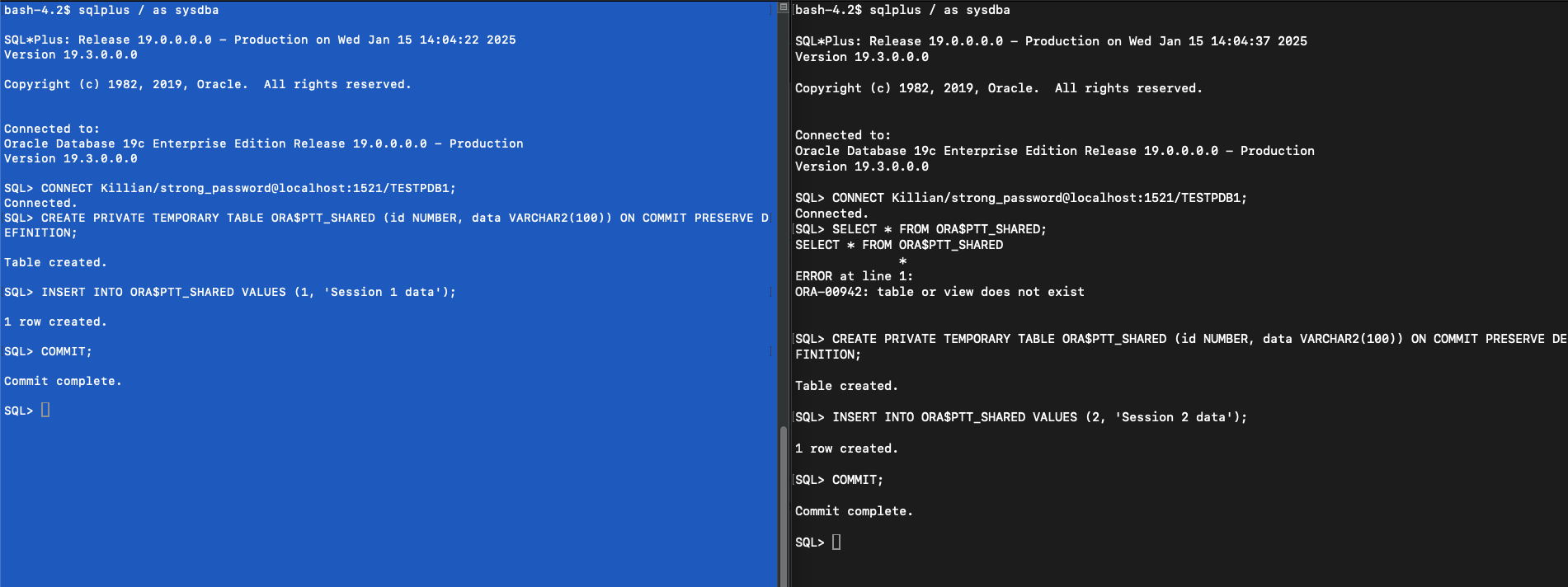
Yes, I know a password is showing. This is only a demo
Scenario 4: Working with Savepoints
PTTs also work well with transaction control:
CREATE TABLE EMPLOYEES (
    emp_id NUMBER PRIMARY KEY,
    emp_name VARCHAR2(100),
    salary NUMBER
);

INSERT INTO EMPLOYEES VALUES (1, 'Cody Maverick', 50000);
INSERT INTO EMPLOYEES VALUES (2, 'Tank Evans', 60000);
COMMIT;
-- Create a PTT with employee data
CREATE PRIVATE TEMPORARY TABLE ORA$PTT_EMP_WORK AS SELECT * FROM EMPLOYEES;
SAVEPOINT point1;
SELECT COUNT(*) FROM ORA$PTT_EMP_WORK;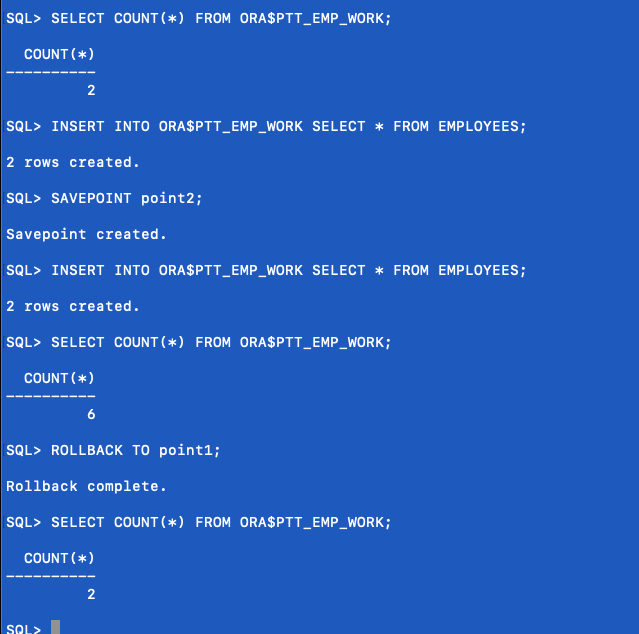
-- Double the data

INSERT INTO ORA$PTT_EMP_WORK SELECT * FROM EMPLOYEES;

SAVEPOINT point2;
-- Add more data
INSERT INTO ORA$PTT_EMP_WORK SELECT * FROM EMPLOYEES;
SELECT COUNT(*) FROM ORA$PTT_EMP_WORK;-- Roll back to first savepoint
ROLLBACK TO point1;
SELECT COUNT(*) FROM ORA$PTT_EMP_WORK;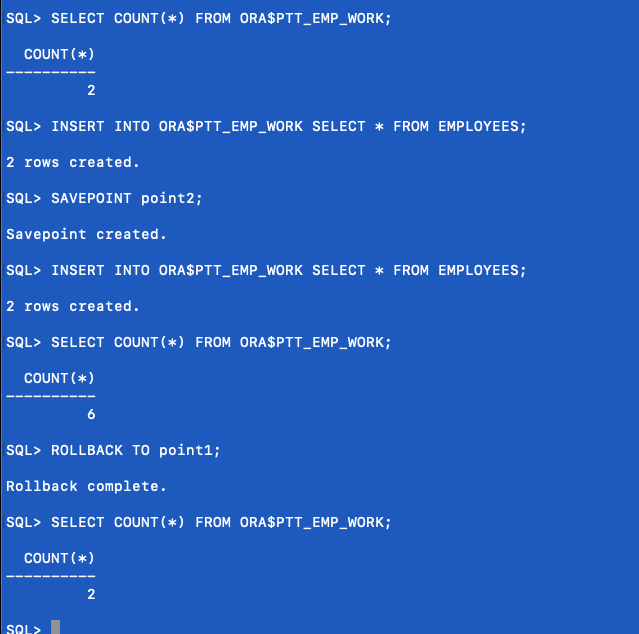
Best Practices and Limitations
After running through these demos, here are the key things to remember:
-
Naming Rules: - Must start with ORA$PTT_
-
Maximum length: 128 characters (including prefix)
-
Maximum 16 PTTs per session
Performance Considerations:
-
No undo/redo generation
-
Uses temp tablespace
-
Perfect for large temporary datasets
-
Statistics are not maintained
Automatic Cleanup:
-
Session end (for PRESERVE DEFINITION tables)
-
Transaction commit (for DROP DEFINITION tables)
-
Abnormal session termination
That's Private Temporary Tables in action.
For more details, check out the Oracle Documentation on Private Temporary Tables.
-Killian